
This guide covers page settings in Gutenburg. The page configuration can be updated to change page size, margins, and more.
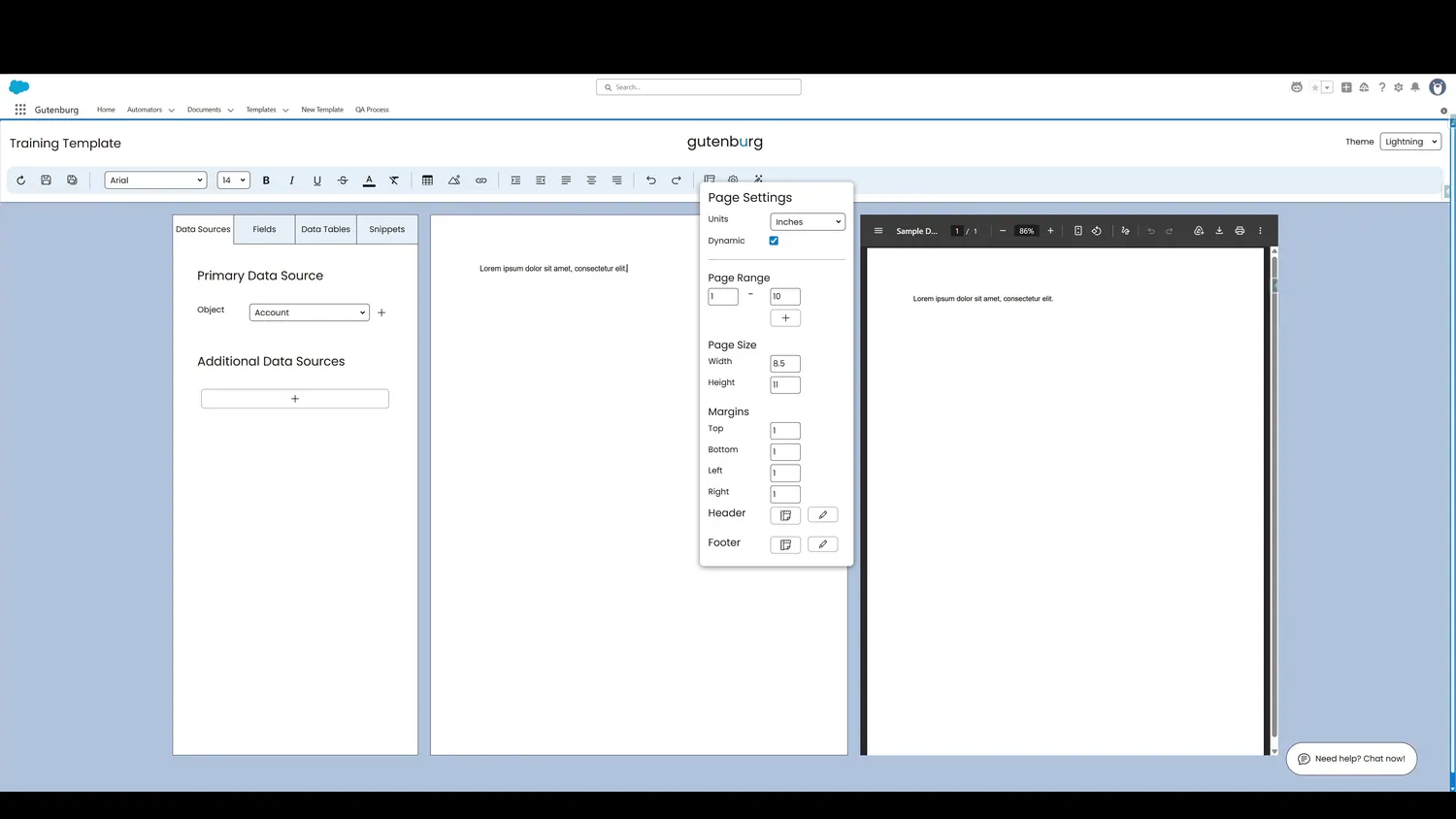
Controls and settings
- Unit of MeasurementDimensions can be measured in inches, centimeters, or pixels.
- Dynamic PagesThis advaned setting controls if page range definitions are treated as static or dynamic.
- Page RangesIf the document layout needs to adjust between sections, such as switching page orientation from portrait to landscape, page ranges are used to define distinct page layouts within a single document.
- Page WidthDefines the page width using the specified unit of measurement.
- Page HeightDefines the page height using the specified unit of measurement.
- Top MarginDefine the top-margin using the specified unit of measurement.
- Bottom MarginDefine the bottom-margin using the specified unit of measurement.
- Left MarginDefine the left-margin using the specified unit of measurement.
- Right MarginDefine the right-margin using the specified unit of measurement.
- Edit HeaderClick here or at the top of the page in the canvas to edit the header.
- Edit FooterClick here or at the bottom of the page in the canvas to edit the footer.